Table of contents
Some things don't work as a text. A story about your day, the way you laugh at the end of it, the face you make when you say you miss someone. You want to say those out loud. But when you and your partner live seven hours apart, a call means one of you is either half asleep or sneaking out of a meeting.
Pulse is a video conversation you don't have to have at the same time. You record a short clip and send it. Your partner watches it when they're free, then records one back. Back and forth, like a call that stretches across a whole day.
How a conversation goes
You open Pulse and record. Before you send, you can watch it back and retake it if you want. The screen tells you when the other person is likely to see it: "Lucía sees it when free — it is 9 PM in Madrid."
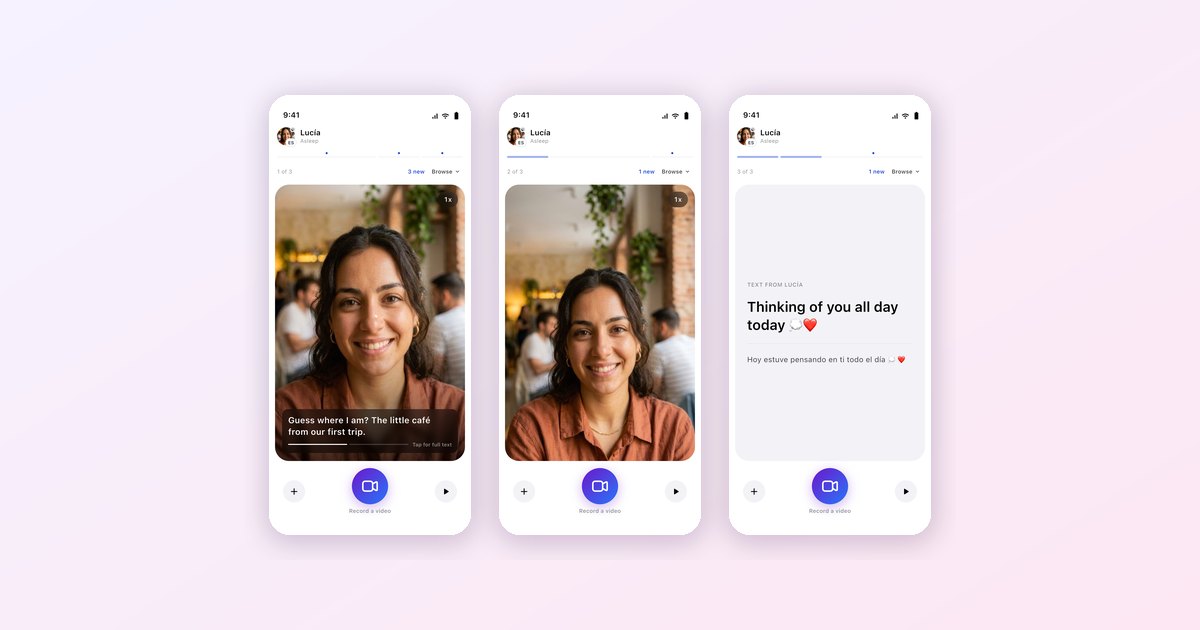
When Lucía opens Pulse, your clips play one after another in the order you sent them, so three short videos play like one longer message. When she reaches the end, the app tells her she's caught up: "That was the last one. Your turn to send something back."


That's the whole idea. There's no feed to scroll, nothing to like. It's a conversation where each of you takes a turn when you have a minute.
The translation is in the subtitles
Here's what makes it work across languages. When Lucía records a clip in Spanish, Heartline transcribes what she says and translates it, and you watch her with subtitles in English. You hear her actual voice and see her actual face, and you still understand every word.
Her clip reaches you once its subtitles are ready, which takes a few seconds, so you never get a video you can't follow. Tap the subtitles to read the full text, or switch to the original if you're practicing her language.
This is the part that's hard to get any other way. Voice notes in a language your partner doesn't speak are just sound. A video message with real subtitles is something they can actually reply to.
Knowing when they're there
At the top of Pulse you can see what your partner is doing: "Watching your clip," "Recording a reply," "In Pulse," or "Away." It's a small thing that makes an asynchronous conversation feel less like sending a message into the dark. If you see "Recording a reply," you know one is coming.
Not just video
Sometimes you don't want to be on camera. The plus button adds a photo or a short text card to the same conversation instead. Text cards are translated for your partner automatically. Photos and cards stay on screen for ten seconds as the conversation plays, then it moves on to the next one.
Where it fits
Pulse is for the in-between: a story from the walk home, a clip of the view from your office, a sleepy "good morning" recorded at their midnight. For the long talks there are live-translated calls. For something waiting when they wake up, there's Morning Moment. And if you're managing a big time difference, our long-distance guide covers how couples combine them.
Heartline provides real-time translation for text, voice, and video calls — built specifically for cross-language couples. Available free on iOS and Android.
Frequently asked questions
What is Pulse in Heartline?
Pulse is a video conversation you take turns in. You record a short clip, your partner watches it when they are free and records one back.
How does Pulse work across languages?
Heartline transcribes what you say in a clip and translates it, so your partner watches you with subtitles in their language. The clip arrives once its subtitles are ready.
Can I send something other than video?
Yes. You can add a photo or a short text card to the same conversation. Text cards are translated automatically.
Can I see if my partner is watching?
Yes. Pulse shows whether your partner is watching your clip, recording a reply, in Pulse, or away.
Try Heartline for free
Love speaks every language. Text, voice and video — translated in real time.