Table of contents
Long relationships across languages tend to run on logistics. When are you free, did the flight land, what time is it there. Months of that and you can forget to ask each other anything that isn't about the schedule.
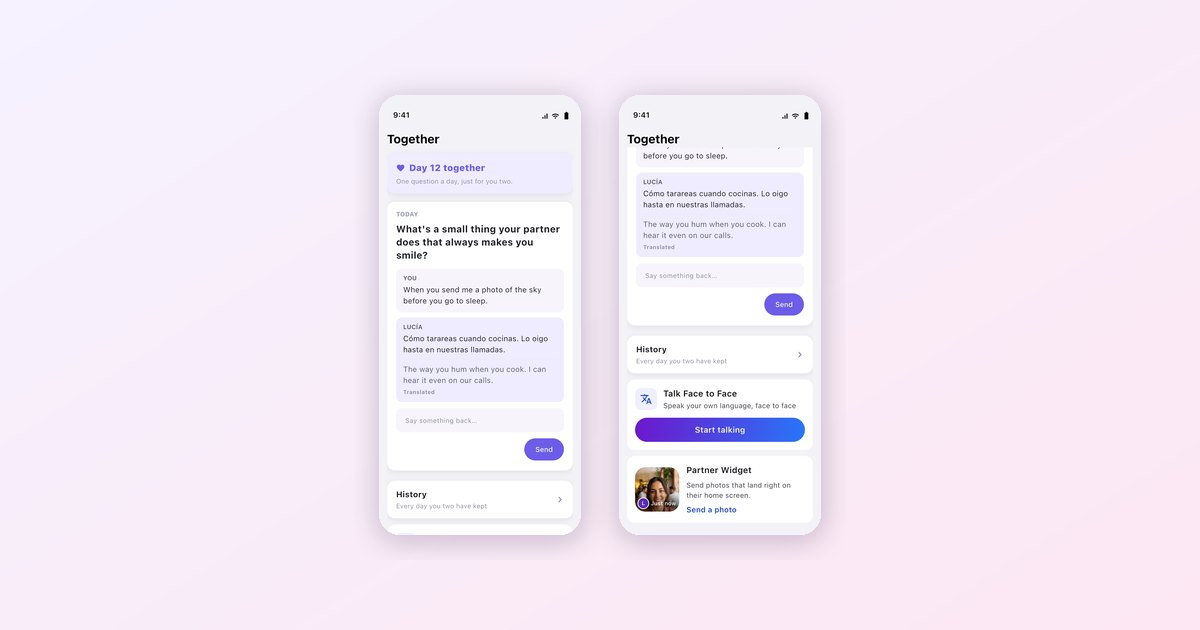
The Together tab is where Heartline keeps the things you do as a couple rather than the things you arrange. Right now that's three: a daily question, face-to-face translation for when you're finally in the same room, and a widget that puts your partner's latest photo on your home screen.
One question a day
Every day there's one question, just for the two of you. Some are light, some aren't. "What's a small thing your partner does that always makes you smile?" is a typical one.


You each write your answer in your own language and Heartline translates the other's. In the screenshot, Lucía writes "Cómo tarareas cuando cocinas. Lo oigo hasta en nuestras llamadas," and her partner reads "The way you hum when you cook. I can hear it even on our calls." Then there's a box to say something back.
It sounds small, and it is. That's why it works. A question is easier to answer than a blank chat box, and over a few weeks you end up knowing things that never come up in "how was your day." The tab counts the days you've kept ("Day 12 together") and keeps a history you can scroll back through.
Face to face, in your own languages
Eventually the long-distance part ends, at least for a visit, and you're sitting across a table. Talk Face to Face is for that. You tap Start talking, set the phone between you, and each of you speaks your own language while Heartline translates on screen.
It's useful well beyond the two of you: a dinner with their friends, a pharmacy, a taxi, or the first time you meet each other's families.
A photo on their home screen
The Partner Widget sits on your home screen and shows the last photo your partner sent there. From the Together tab you tap Send a photo, pick something, and it lands on their widget, on iPhone or Android.
There's no message attached and nothing to reply to. It's a photo of a sunrise, or a coffee, or their face, waiting the next time they pick up their phone. For couples in different time zones it's a nice way to say "I'm here" without asking for anything back.
Where it fits
Together sits alongside Pulse, the video conversation you take turns in, and Morning Moment, and the long talks happen on translated calls. If you want to know what your partner's day looks like before you call, look at Share your day.
Heartline provides real-time translation for text, voice, and video calls — built specifically for cross-language couples. Available free on iOS and Android.
Frequently asked questions
What is the daily question in Heartline?
Each day the Together tab shows one question for the two of you. You each answer in your own language and Heartline translates your partner's answer.
Can Heartline translate in-person conversations?
Yes. Talk Face to Face lets each of you speak your own language while Heartline translates on screen.
Does the Partner Widget work on Android?
Yes. The Partner Widget is available on both iPhone and Android and shows the latest photo your partner sent to it.

Try Heartline for free
Love speaks every language. Text, voice and video — translated in real time.